
First, ensure you have a working SFTP server.
首先,請確保您的 SFTP 伺服器運作正常。
Once you have installed the SFTP server, you can target it in the WriteImageSFTP function in this way:
安裝好SFTP 伺服器後,您可以透過以下方式在WriteImage SFTP函數中指定它:
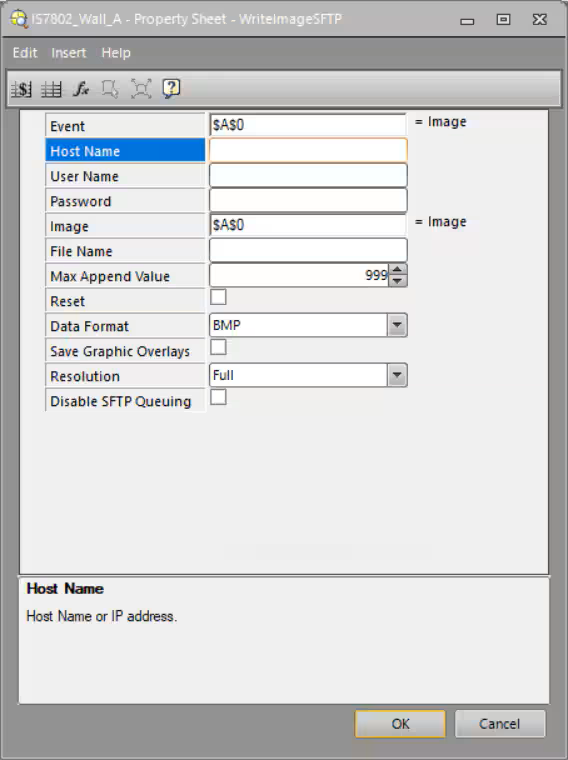
Host Name: Name or IP address of the PC where the SFTP server is running;
主機名稱:執行 SFTP 伺服器的 PC 的名稱或 IP 位址
User Name: Name created in the SFTP server to log in;
使用者名稱:在 SFTP 伺服器上建立的用於登入的名稱;
Password: password (if any) created in the SFTP server to log in;
密碼:在 SFTP 伺服器上建立的用於登入的密碼(如有) ;
Fill or select all the other needed fields (File Name, Data Format and so on);
填寫或選擇所有其他必需欄位(檔案名稱、資料格式等);
Once you select the OK button and the camera goes Online, communication should start.
選擇「確定」按鈕後,攝影機將上線,通訊即可開始。
了解更多
點擊 YuYou In-Sight視覺產品 或透過 LINE 聯繫我們,探索更多機器視覺解決方案,提升您的生產流程!
